These appendices consist of optional exercises, and are mentioned in earlier parts of the tutorial. Go through them only if you have time.
4. Queries in AiiDA - Examples and Exercises
4.1. Optional exercises on relationships (Task 3)
Hint for the exercises:
You can have projections on properties of more than one entity in your query. You just have to add the
projectkey (specifying the list of properties that you want to project) along with the corresponding entity when you append it.
Exercises: Try to write the following queries:
Find all descendants of a
StructureDatawith a certainuuid(descendants indicate all nodes that can be reached by following outgoing links starting from a given node, with any number of hops). For every match, print both theStructureDatanode and the descendant.Find all the
FolderDatanodes created by a specific user.
4.2. Optional exercises on attributes and extras (Task 4)
Hint for the exercises:
You can easily order or limit the number of the results by using the
order_by()andlimit()methods of the QueryBuilder. For example, we can order all ourCalcJobNode``s by their ``idand limit the result to the first 10 as follows:qb = QueryBuilder() qb.append(CalcJobNode, tag='calc') qb.order_by({'calc': 'id'}) qb.limit(10) qb.all()
Exercises:
Write a code snippet to check how many pseudopotentials you have for each element.
Smearing contribution to the total energy for calculations:
Write a query that returns the smearing contribution to the energy stored in some instances of
Dictoutput by aCalcJobNodegenerated by running aPwCalculationprocess.Extend the previous query to also get the input structures of the
CalcJobNode.Which structures have a smearing contribution to the energy smaller or equal to
-0.02?
4.3. Summarizing what we learned by now - An example
At this point you should be able to do queries with projections, joins and filters.
Moreover, you saw how to apply filters and projections even on attributes and extras.
Let’s discover the full power of the QueryBuilder with a complex graph query that allows you to project various properties from different nodes and apply different filters and joins.
Imagine that you would like to get the smearing energy for all the calculations that have a smearing energy below a given value and have a Sn2O3 as input. Moreover, besides the smearing energy, you would like to print the units of this energy and the formula of the structure that was given to the calculation. The graphical representation of this query can be seen in Fig. 4.2 and the actual query follows:
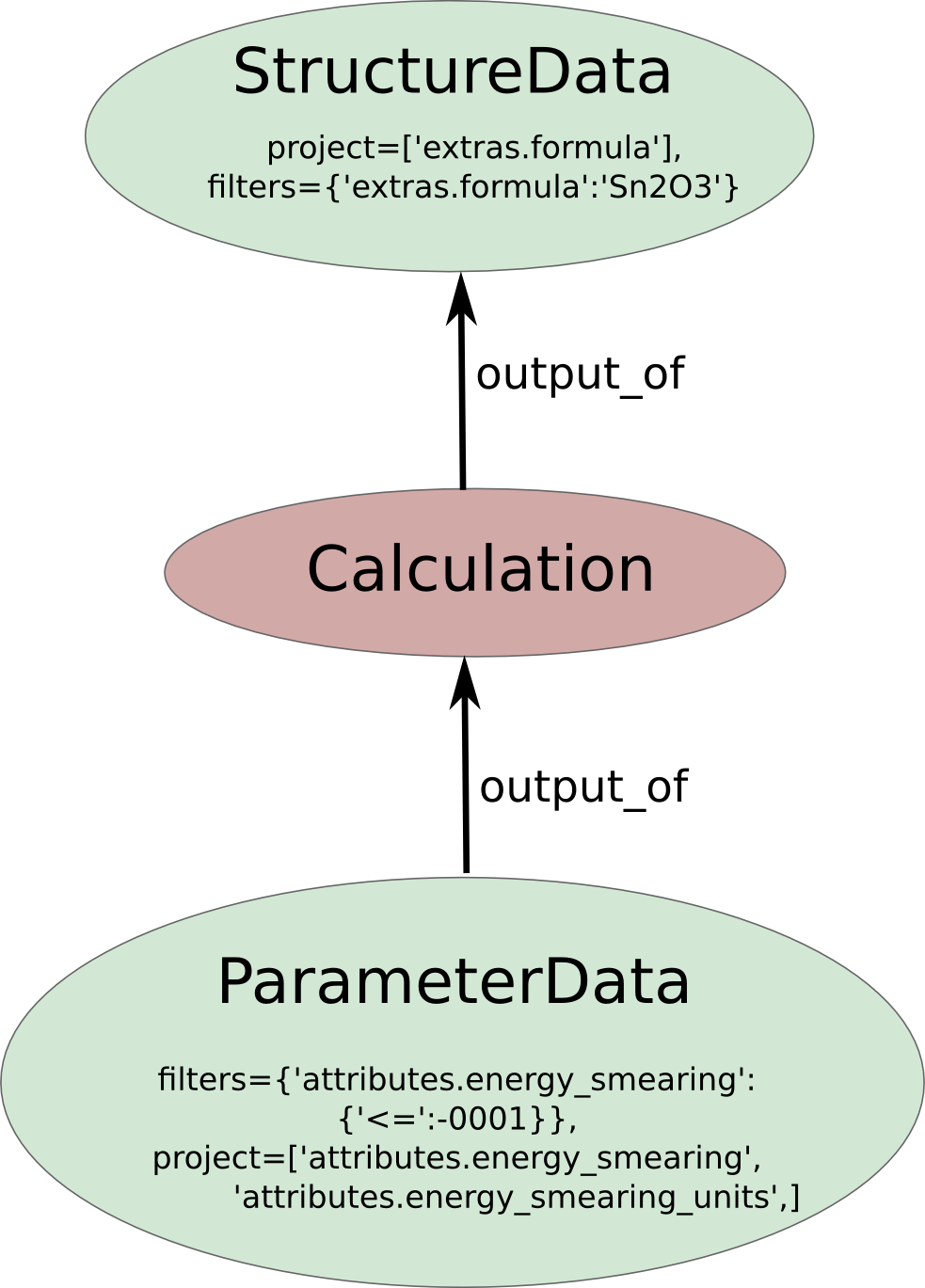
Fig. 4.2 Complex graph query.
qb = QueryBuilder()
qb.append(
        StructureData,
        project=['extras.formula'],
        filters={'extras.formula': 'BaO3Ti'},
        tag='structure'
    )
qb.append(
        CalcJobNode,
        tag='calculation',
        with_incoming='structure'
    )
qb.append(
        Dict,
        tag='results',
        filters={'attributes.energy_smearing':{'<=':-1e-8}},
        project=[
            'attributes.energy_smearing',
            'attributes.energy_smearing_units',
        ],
        with_incoming='calculation'
)
qb.all()